
Modifying your plan
Modifying plans on the TEFLHandbook is relatively straightforward and everything is prorated so that you never pay more than you need to. Hopefully this article covers everything. If not, feel free to reach out to support and we'll be happy to clarify any doubts that you have.
Upgrading your plan
To upgrade your current plan so that you can add more teachers to your account, go to the accounts option on the main menu and select the tab subscriptions to see your current plan's details.
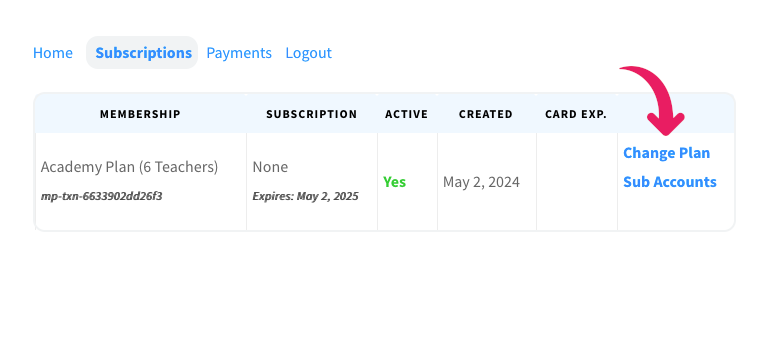
On the right hand column, select change plan to reveal a popup with your options.
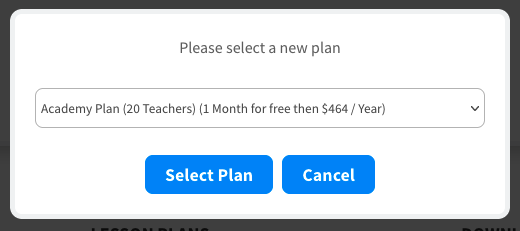
Select the plan you want and go through the signup process to update to that plan.
When you update to a new plan, Your billing cycle is reset to the current date and you will pay an amount which takes into account the prorated value of your current membership.
Downgrading your plan
To downgrade your current plan to remove superfluous teacher accounts, go to the accounts option on the main menu and select the tab subscriptions to see your current plan's details.
On the right hand column, select change plan to reveal a popup with your options.
Select the plan you want and go through the signup process to update to that plan.
When you update to a lower-level plan, you will be prorated anything owed to you by receiving extra days totalling the value of the difference.
Cancelling subscriptions
To cancel your subscription, go to the accounts option on the main menu and select the tab subscriptions to see your current plan's details. On the right hand column, select Cancel to reveal a popup where you can cancel your membership.
When you cancel your subscription, you will still have access to all content until the end of your current billing cycle.